Document Library
The Document Library is your central hub for managing documents, enabling collaboration, and organizing content for your AI agents.
Document Library Overview
The Document Library provides a comprehensive file management system where you can organize, share, and manage documents.
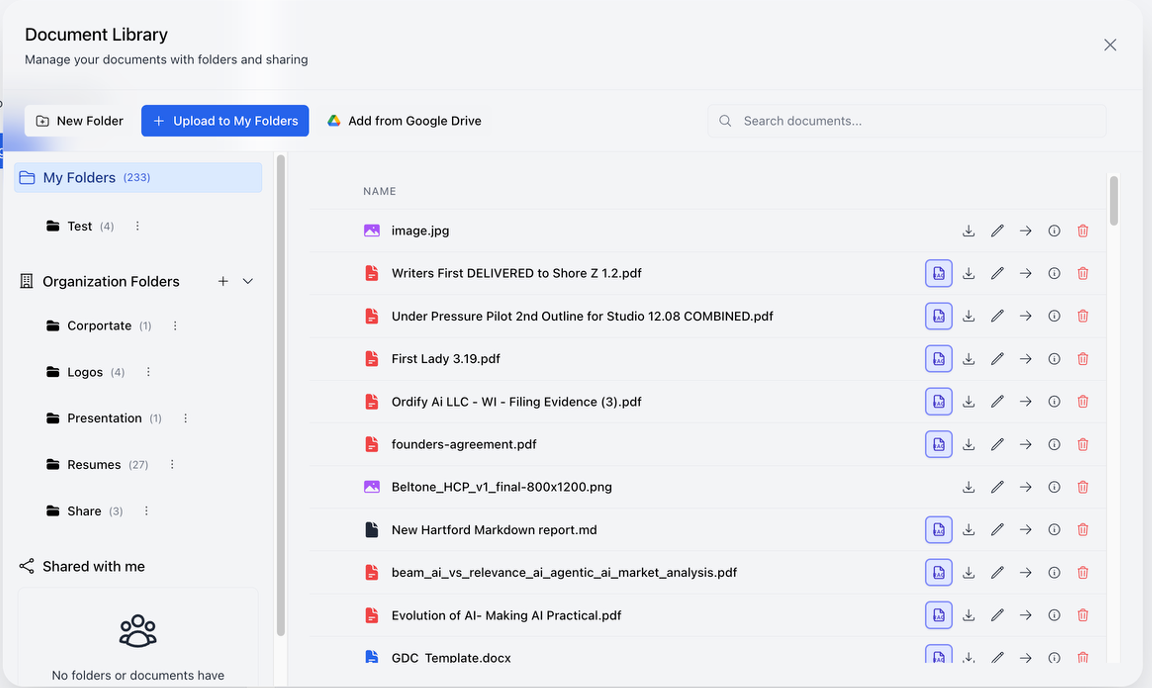
File Organization
The Document Library supports a folder-based organization system:
- My Folders: Your personal document collection, organized in folders you create
- Organization Folders: Shared folders accessible across your entire organization
- Shared with me: Documents and folders that others have shared with you
Retrieval Augmented Generation (RAG) & Knowledge Base
To learn how to turn these documents into a knowledge base for your agents using Retrieval Augmented Generation (RAG), including syncing entire folders, please visit the RAG & Knowledge Base page.
Adding Documents
Upload from Your Computer
- Click the "+ Upload to My Folders" button
- Select files from your computer
- Files are automatically added to your personal folders
Add from Google Drive
- Click the "Add from Google Drive" button
- Authenticate with your Google account
- Select documents from your Google Drive
- Documents are imported into your Document Library
This integration makes it easy to bring existing documents from Google Drive into Ordify without manual downloads and uploads.
Sharing and Collaboration
Ordify is designed for team interaction with AI, where you can share inputs and outputs with your team.
Sharing Folders
- Organization Folders: Create folders that are automatically accessible to all members of your organization
- Team Collaboration: Multiple team members can access and contribute to shared folders
- Centralized Knowledge: Build a shared knowledge base that all team members and agents can access
Sharing Files
- Individual Files: Share specific documents with team members
- Bulk Sharing: Share entire folders with your organization
- Access Control: Control who can view, edit, or manage shared documents
Team AI Interaction
The Document Library enables collaborative AI workflows:
- Shared Context: When team members use AI agents, they can leverage the same shared documents
- Consistent Knowledge: All agents across your organization can access the same organizational knowledge
- Collaborative Inputs: Team members can contribute documents that enhance everyone's AI interactions
- Shared Outputs: AI-generated content and insights can be saved back to shared folders for team access
Best Practices
- Organize by Purpose: Create folders for different departments, projects, or knowledge areas
- Use Organization Folders: Leverage organization folders for company-wide knowledge that all agents should access
- Share Strategically: Share documents with team members who need access, maintaining appropriate access controls