RAG & Knowledge Base
RAG (Retrieval Augmented Generation) is a technique that enriches AI agents with additional knowledge without requiring extensive retraining. Ordify AI provides powerful RAG capabilities that allow you to bring your own data to your AI agents.
What is RAG?
Once you add documents to your personal RAG repository, you can access this information in Chat, through the RAG tool, or selectively integrate different documents into your agents' knowledge base.
Instead of relying solely on the AI's training data, RAG allows your agents to:
- Access up-to-date information from your documents
- Reference specific company knowledge, policies, or procedures
- Answer questions based on your proprietary content
- Maintain context from your organization's documents
RAG Sync
Ordify AI introduces powerful synchronization capabilities to keep your agents updated with your latest documents effortlessly.
Folder RAG Sync
You can now synchronize entire folders with your RAG knowledge base. This eliminates the need to manually select individual files.
- One-Click Sync: Toggle RAG sync for any folder in your Document Library via the Folder Info modal.
- Visual Status: Easily see the sync status of your folders.
- Syncing: A pulsing animation indicates files are being processed.
- Synced: A visual indicator (CPU chip icon) shows the folder is live in RAG.
- Failed: Receive alerts if any synchronization issues occur.
- Recursive Sync: When you sync a folder, all compatible documents within it are automatically processed and made available for RAG.
- Auto-Updates: Adding new files to a synced folder automatically updates your RAG knowledge base.
Agent Knowledge Configuration
Managing what your agents know is now simpler and more powerful.
- Folder-Based Knowledge: Instead of selecting single files, you can now assign entire folders to an agent's knowledge base.
- Dynamic Updates: As you add content to a synced folder, the connected agents automatically gain access to the new information without manual reconfiguration.
- Granular Control: You can still mix and match specific files with folders to fine-tune exactly what information each agent can access.
- Visual Feedback: The Agent Knowledge interface clearly displays which folders are connected and their sync status.
Using RAG with Agents
In Chat
Access your RAG documents directly in chat conversations:
- Chat with Agents: Use
@agent_nameto interact with specific agents that have been configured with specialized knowledge. - Chat with Your Entire RAG Store: By enabling the RAG tool under the Tools menu, you can chat with your entire personal and organizational knowledge base at once. This allows you to interact with all your personalized data simultaneously without needing to switch between specific agents.
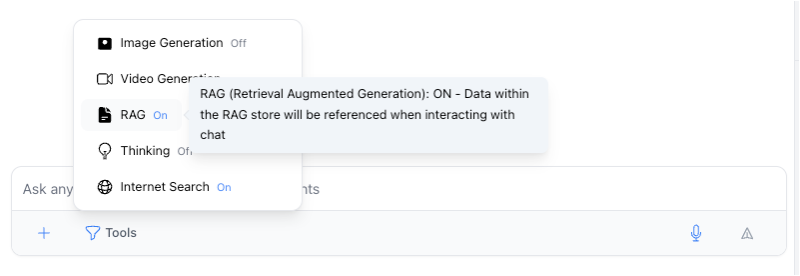
- Ask questions about your documents
- Reference specific information from your library
- Get answers based on your organization's knowledge
The RAG Tool
The RAG tool allows agents to:
- Search across all your enabled documents
- Retrieve specific information on demand
- Combine document knowledge with real-time AI capabilities
Best Practices
- Organize by Topic: Group related documents into folders (e.g., "HR Policies", "Project Specs") and sync the whole folder.
- Keep it Fresh: Use Folder Sync to ensure agents always have the latest versions of documents as you update files in the folder.
- Selective Knowledge: Create specialized agents with access to specific folders to ensure relevant and accurate responses (e.g., a "Legal Bot" with access to the "Contracts" folder).